

Competitive Analysis Template
Competitive analysis template walkthrough — the 10 fields that matter, the free scorecard, and the competition no spreadsheet shows. Watch on YouTube
TL;DR
- A competitive analysis template is only useful if every column maps to a decision someone will actually make. Most are feature checklists that quietly push you toward copying competitors.
- The scorecard tool below lets you weight 6 dimensions, score up to 4 rivals, and export a filled template as CSV in about three minutes. That is the part you save and reuse.
- Track 5 to 7 active competitors, not 30. Score them so threats are ranked, not flat. Refresh the fast-drifting fields (pricing, positioning, hiring) weekly, the rest monthly.
- Buyers see a competitor in 68% of deals, yet 85% of loss reasons logged in a CRM are wrong. The template fixes that only if you feed it real win/loss answers, not gut feel.
- For agencies, the competition that decides your week is invisible in any spreadsheet: who else bids the same opportunity. GigRadar pipeline data shows reply rate collapsing 4.5× when a job gets crowded.
Sellers now go head-to-head with a named competitor in 68% of deals, yet the average go-to-market team rates its own competitive selling a 3.8 out of 10, a gap Crayon estimates costs two to ten million dollars a year in deals that were winnable. (Crayon, State of Competitive Intelligence)
So the problem is not awareness. Almost everyone knows who they compete with. The problem is that the artifact most teams build to handle it, a competitive analysis template, is usually a graveyard of columns nobody looks at after the kickoff slide.
This guide gives you a template that survives contact with a real week, the scorecard tool to fill it in, and the one piece of competitive data that no spreadsheet can show you.
Why most competitive analysis templates make you worse, not better
The most common failure mode has a name. Ainna, which studies competitive analysis for SaaS, calls it the feature-parity trap: the reflex to match every feature a competitor ships. (Ainna)
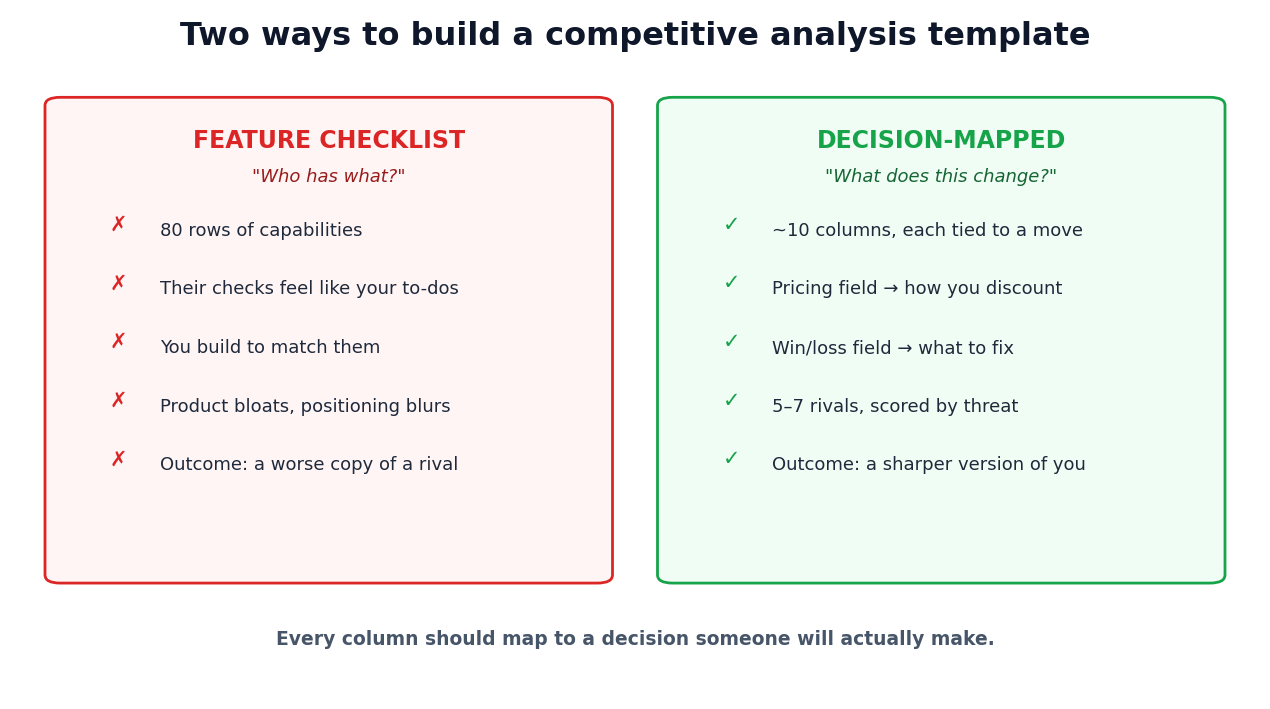
A template built as a giant feature matrix actively encourages it. You list 80 capabilities down the side, mark who has what, and the rows your competitor checks and you don't start to feel like a to-do list. So you build them. The product bloats, the positioning blurs, and you have spent a quarter becoming a worse copy of someone else.
You can watch this play out in public. A founder in r/SaaS put it bluntly after burning hours on a competitor teardown.
"I spent hours analyzing competitors' features, pricing, and positioning. It didn't help. Stop obsessing over competitors, obsess over customers."
u/AdSecret5838, r/SaaS
The lesson is not "ignore competitors." It is that a teardown with no decision attached to it is just procrastination that feels like work.
Agencies do the service-line version of this. A competitor lists TikTok ads, influencer, CRO and analytics, so you bolt them on, regardless of whether you can deliver them or whether your buyers care. Aqute, which catalogs competitive-intelligence mistakes, puts "copying competitors instead of differentiating" near the top of the list. (Aqute)
Before a field goes in your template, name the decision it changes. "How does Competitor X price this?" changes how you discount. "What feature does X have that we lack?" changes nothing unless a buyer told you it cost you a deal. Columns without a decision owner get cut.
A good template does the opposite of a checklist. It forces every observation back toward a choice: where to price, what to say on a call, which buyers to chase, what to deliberately not build. The columns below are chosen on exactly that basis, and the tool that follows scores them.
Build your scorecard: weight what matters, rank the threat
Here is the part you came for. Score up to four competitors across six dimensions, set how much each dimension matters to your business, and the tool computes a weighted threat score for each rival plus your biggest exposure. Then export the whole thing as a CSV you can drop into Sheets or Notion.
This is deliberately small. Unkover's widely-copied template caps the "minimum useful" analysis at a handful of fields and 5 to 7 active competitors, precisely so it can be updated weekly without burning anyone out. (Unkover)
Free Tool
Score 1 (weak) to 5 (dominant) for each rival. Set each dimension's weight. Threat score is the weighted average. Export fills a ready-to-use template.
| Dimension | Weight | Rival A | Rival B | Rival C | Rival D |
|---|---|---|---|---|---|
| Weighted threat | – | – | – | – |
Nothing is uploaded. Everything runs in your browser.
Notice the two scoring rows that do the heavy lifting: "how often we lose to them" and customer sentiment. Those are not things you scrape off a homepage. They come from talking to buyers, which is the part almost everyone skips.
The 10 fields that earn a place in a competitive analysis template
Strip a good template down and you get two kinds of fields: slow-changing identity, and fast-drifting intelligence. Klue's competitive playbook organizes a profile around product, pricing and discounting, marketing, customer experience and market position. (Klue) Below is the version that holds up for agencies and founders, in the order you should populate it.
| # | Field | The decision it drives | Refresh |
|---|---|---|---|
| 1 | Name & type (direct / indirect / substitute) | Whether to track them at all | Quarterly |
| 2 | Business model (retainer, project, subscription) | How to read their pricing | Quarterly |
| 3 | Pricing & deal-pricing notes | Where you hold or flex on discount | Weekly |
| 4 | Target segment & ICP | Which buyers to avoid head-on | Monthly |
| 5 | Positioning statement (their homepage promise) | Where the open space is | Weekly |
| 6 | 2–3 core features / services | What is table stakes vs differentiator | Monthly |
| 7 | Customer sentiment (G2 / Reddit themes) | The credibility gap you attack | Monthly |
| 8 | Top 3 reasons we lose to them | What to fix in sales & product | Per deal |
| 9 | Top 3 reasons we beat them | What to lead with on calls | Per deal |
| 10 | Threat score & status (active / watch / parked) | Where research time goes | Monthly |
Fields 8 and 9 are where templates live or die. Clozd reports that 85% of loss reasons recorded in a CRM are simply wrong, because reps rarely get an honest answer and rarely record it. (Clozd) A template fed by CRM dropdowns inherits that error. One fed by a five-minute "why did you really pick them" buyer conversation becomes the most valuable document your team owns.
Pick the framework that fits the decision you are making
"Competitive analysis" is not one thing. SWOT, Five Forces and a feature matrix answer completely different questions, and the mistake is reaching for whichever one you learned first. Match the framework to the decision instead.
| Framework | Best for the question | Cadence |
|---|---|---|
| Competitor profiling | "Who are they and where are they exposed?" The backbone of the template. | Continuous |
| Win/loss analysis | "Why do we actually win or lose?" The highest-ROI input. | Per deal |
| Feature / parity matrix | "Where are we at parity vs intentionally different?" Handle with care. | Monthly |
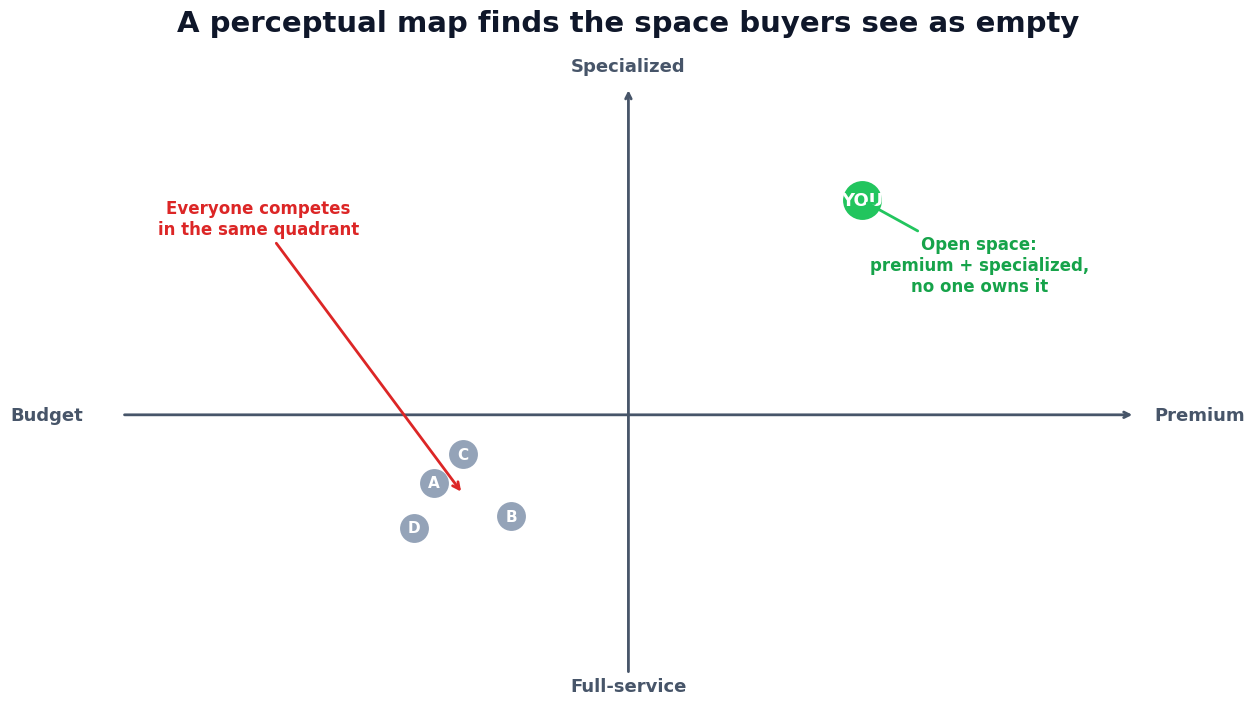
| Perceptual / positioning map | "Where is the open space buyers see?" (HBS) | Quarterly |
| Strategy canvas / value curve | "How do we escape competing on the same factors?" (Blue Ocean) | Quarterly |
| SWOT | "What does all of this mean for us?" A synthesis layer, not a starting point. (Asana) | Quarterly |
| Porter's Five Forces | "Is the whole category getting harder?" A macro lens. (Investopedia) | Annually |
The pattern: profiling and win/loss feed the template continuously. The visual frameworks (perceptual map, strategy canvas, SWOT) sit on top of it and get rebuilt a few times a year. Five Forces is the annual sanity check on whether your whole playbook still fits the market. Reach for the macro tools too often and you produce industry essays instead of battlecards.
A strategy canvas needs intensity, not presence. Don't mark "has reporting: yes." Rate how hard each rival leans into reporting on a 1 to 5, the same scores you just entered in the tool. That is what turns a flat matrix into a value curve you can actually differentiate against. The same approach underpins a sharp value proposition canvas.
The competition you cannot see in any spreadsheet
Every framework above analyzes your business rivals. For agencies, that misses the competition that actually decides a given week: who else shows up on the exact opportunity you are bidding.
This is where first-party data beats any template. We looked at 59,339 GigRadar proposals across 30,964 distinct Upwork jobs (Jan–Feb 2026) and joined each proposal to how many other GigRadar agencies bid the same job. The reply rate does not drift down. It collapses.
Two numbers make this concrete. 67% of all GigRadar proposals land on jobs where at least one other GigRadar agency is also bidding. And the single most-contested job in the window drew more than two dozen competing agencies, all arriving within minutes with similar templates.
The cannibalization is worse in exactly the categories that look most attractive. A hot Data Science or IT job that 6 to 10 agencies all pile onto falls from roughly a 10% reply rate when uncontested to 1 to 4%.
No competitive analysis template captures this, because it is competition at the opportunity level, not the company level. It is also the single biggest lever an agency owner has, and it is invisible in your own dashboard. This is the layer GigRadar is built to work on: surfacing the under-fished niches and flagging the saturated ones before you spend a Connect on them. For the macro view of where that competition is heading, our Upwork market report tracks it category by category.
Free for Upwork agencies
See the competition your template can't
GigRadar scores every Upwork opportunity by client quality and how crowded it is, so your agency bids the jobs you can actually win instead of the ones everyone already found.
Get Your Free Agency Audit →The five mistakes that turn a template into busywork
Aqute's catalog of competitive-intelligence failures maps almost perfectly onto the templates that get abandoned. Here are the five that matter, and the column or habit that fixes each.
Fix: a "our stance" column with three options only, match, differentiate, or ignore. Make not-building an explicit, recorded choice.
Fix: the "type" field. In-house teams, freelancers and adjacent platforms take deals too. For agencies, "they decided to hire internally" is a competitor.
Fix: the status column. 5 to 7 active, the rest on watch. The threat score from the tool tells you where the deep battlecards go.
Fix: a change-log row instead of a rebuild. Unkover's 15-minute weekly check on pricing, positioning and hiring keeps the file alive without ballooning it.
Fix: the "why we diverge" column. Win/loss often shows buyers picked a rival for reasons you should not copy (an unsustainable discount, an over-promise).
Pragmatic Institute found that 83% of companies now run some form of win/loss analysis, and that the teams which share those insights broadly are far more likely to report a higher win rate. (Pragmatic Institute) The lesson for a template is blunt: a competitive document locked in one person's drive is worth a fraction of one your whole team reads and feeds.
A refresh cadence that survives a busy week
The reason templates die is not laziness, it is that "update the competitive analysis" sounds like a half-day job. It should be a tiered habit measured in minutes. Klue recommends refreshing competitive analysis quarterly at minimum while monitoring key rivals continuously. (Klue) Here is how that splits across a calendar.
Check the three fast-drifting fields for active competitors only: pricing page, homepage positioning, and hiring signals (a new sales lead or vertical hire telegraphs a roadmap move). Log changes in a change-log row, don't add rows.
Update review sentiment and marketing-channel data, recompute threat scores, and refresh battlecards from the month's win/loss notes.
Rebuild the perceptual map and strategy canvas. Re-examine your competitor list for new substitutes. Run a fresh SWOT off the accumulated data.
Run Five Forces on the category. Has a new entrant or technology shifted buyer power or substitution risk enough that the whole playbook needs a rethink?
For agencies, fold the opportunity-level layer into the weekly slot. The market shifts that move your numbers most are not a rival's new homepage, they are which jobs got crowded this week, the same signal that drives a healthy sales pipeline and the retention math behind net revenue retention.
Where the template stops and the work starts
A competitive analysis template is not the deliverable. It is the place a habit lives. The columns are worthless until they are fed by real buyer conversations, scored so threats rank, and read by the people who sit in deals.
Your 30-minute starter
Download the scorecard above, fill it for your top four rivals this week, and build one battlecard for whoever scores highest. That single move beats any 40-tab "competitive intelligence dashboard" that no one opens twice. And if you run an agency, remember the rival that costs you the most replies is not on that list at all, it is the crowd that found the same job you did, the kind of positioning and targeting edge GigRadar is built to give you.








