

GigRadar Alternatives: Which Upwork Tools Are Actually Safe? — 2-minute walkthrough comparing Chrome extension tools, offshore BM services, and GigRadar's managed model. Watch on YouTube
I almost lost my Upwork agency in 2019. Every account suspended. $20,000 sunk. Pipeline wiped. Contracts frozen, payouts halted, team sitting idle.
It took a Quora post that hit 22,000 views, 183 upvotes, and the Upwork daily digest (110,000+ inboxes) before someone named Sandy emailed me: "You're back." That year, we hit $250K.
I'm telling you this because when you google "gigradar alternatives," you'll find a dozen comparison pages written by competitors trying to poach you. Every one of them downplays the only thing that actually matters: what happens to your Upwork account when something goes wrong.
$50,000+
Average pipeline value an agency loses from a single Upwork account suspension. That's active contracts frozen, pending payouts held, and months of JSS history erased. No automation tool refund covers that.
This article isn't a comparison chart. You can find those on every competitor's blog, and they all somehow rank themselves #1. Instead, I'll break down the three types of Upwork automation that exist, what each one risks, and why I built GigRadar the way I did after living through the worst-case scenario myself.
The three types of Upwork automation (and what each one costs you)
Every tool on the market falls into one of three categories. The marketing copy makes them sound similar. The risk profiles are not.
The first two categories share one thing: the automation runs from your account. If Upwork's Trust & Safety team flags the activity, your account eats the suspension. Not the tool. Not the vendor. You.
Why Chrome extension auto-bidders are the $5/month trap
Chrome extensions are the most popular category of Upwork automation. They're cheap ($5-50/month), easy to install, and instantly start doing things in your browser.
Here's what they also do: they inject scripts into your Upwork session. They modify page elements. They automate clicks that Upwork's frontend was designed to detect.
How Upwork detects extensions: Browser extensions modify the DOM, inject CSS/JS, and alter network request patterns. Upwork's frontend runs behavioral fingerprinting that tracks mouse movement patterns, typing cadence, and form submission timing. A human submitting a proposal takes 45-90 seconds of active page interaction. An extension does it in 200 milliseconds. That delta is trivial to flag.
Upwork doesn't publish their detection methods (obviously). But the pattern is visible in community forums: accounts get suspended for "irregular activity," the freelancer appeals, and Upwork's Trust & Safety team cites "automated behavior detected on your account."
Here's what that looks like in practice. These are real posts from r/Upwork:
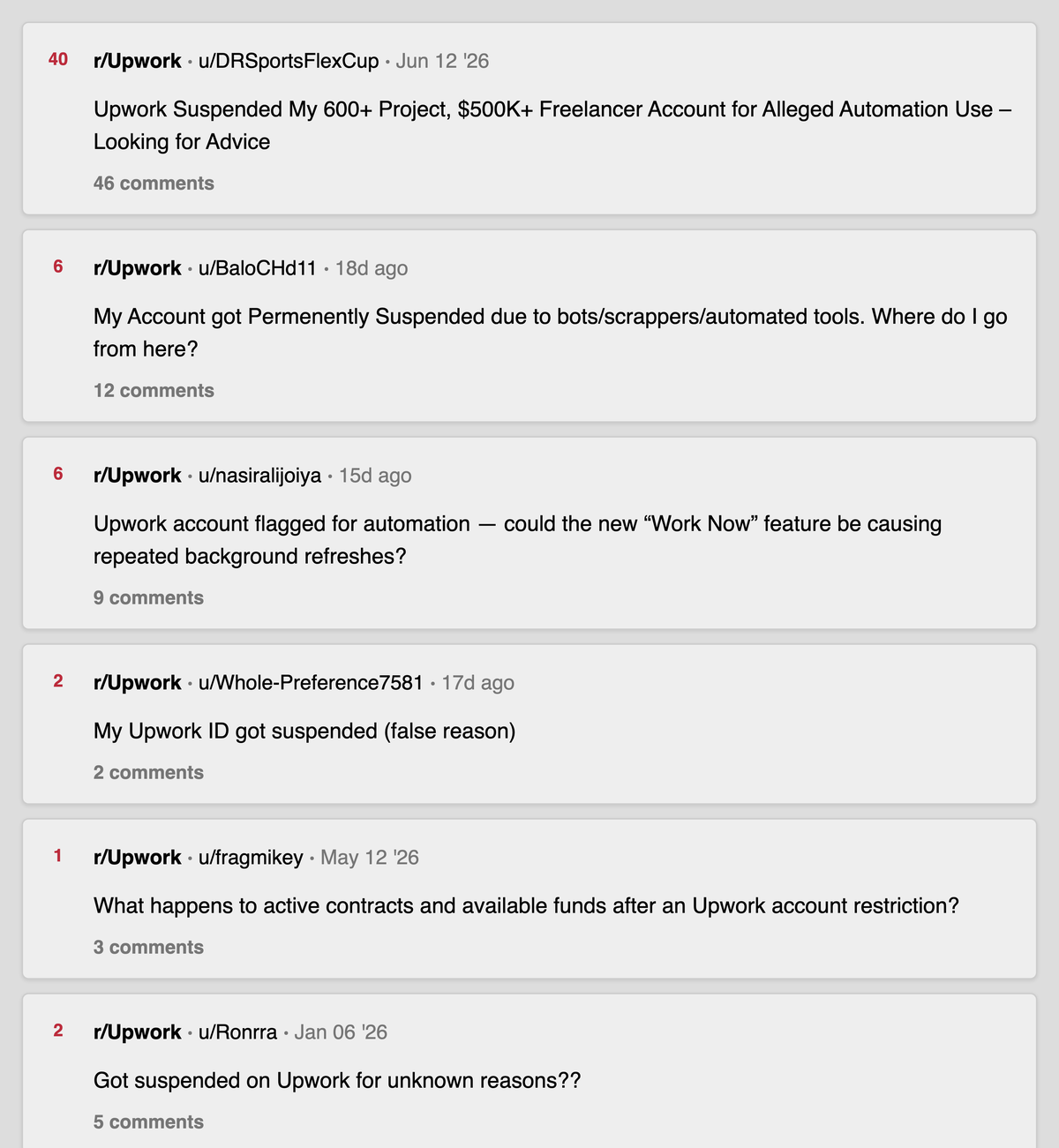
r/Upwork threads on account suspensions for "bots, scrapers, automated tools," January to August 2026. The top result is a $500K freelancer with a 600+ project history. Search on Reddit.
The extension vendor's response? "That's weird, nobody else has reported that." Then you're on your own filing an appeal while your active contracts sit frozen.
Here's the distinction that matters: Upwork's "no bots" policy targets unauthorized browser automation, session hijacking, and scripts that impersonate a personal freelancer account. A Chrome extension doing exactly that, from your logged-in session, is the precise pattern Upwork's Trust & Safety team is designed to catch. The ban risk falls entirely on you, not the extension vendor.
The math nobody shows you
The Real Cost of "Cheap" Automation
Chrome extension
$30/mo
12 months = $360
One account ban
$50K+
Frozen contracts + lost JSS
Recovery time
2-6 mo
If you get reinstated at all
A $30/month extension that gets your account banned once costs more than five years of a managed service. And the ban doesn't just freeze your current contracts. It erases your JSS, your review history, your Top Rated badge, and every relationship you built on the platform.
I know because I lived it. When my accounts got suspended in 2019, we had hundreds of hours invested in profiles, active contracts generating revenue, and a team depending on that pipeline. It all stopped in one afternoon.
The "offshore BM-only" services: safe but stuck
The second category avoids the extension problem entirely. These services assign you a human business manager (usually based overseas) who manually submits proposals on your behalf through Upwork's official agency invitation system.
The safety model is sound. No extensions, no scripts, no automation running from your account. The person operates as a legitimate member of your agency.
But the execution has gaps you won't see until you're committed.
US/UK-only jobs are invisible
Upwork enforces hard location restrictions. If the BM isn't physically in the US or UK, they cannot apply to location-restricted posts. For agencies serving US clients, this cuts out a significant chunk of the highest-budget jobs.
No tech platform behind the human
Pure BM-only services are just outsourced manual labor with no AI scoring, no analytics dashboard, no A/B testing, no performance tracking. You're paying for a person clicking buttons. Scaling means hiring more people, not improving the system.
Response time is human-limited
On Upwork, proposals submitted in the first 15 minutes get disproportionate visibility. A human BM working 8 hours can't cover overnight job postings. A job posted at 2 AM in your timezone sits untouched until morning.
A stranger in your agency
You're inviting someone you've never met into your Upwork agency with permission to send proposals on behalf of your brand. What they write represents you. If they disappear, your automation stops.
These services work for agencies that need basic volume and don't target US/UK-restricted jobs. But they don't scale, and they don't get smarter over time.
What I built after getting banned (and why it's different)
When I clawed back my Upwork accounts and hit $250K that same year, I had one obsession: never again. Whatever system we built had to make account bans structurally impossible for the client.
That's why GigRadar uses a hybrid model that combines the safety of managed business managers with real technology behind them.
Your account is never touched
No browser extension. No login credentials shared. No scripts running on your session.
Your dedicated Business Manager operates from their own separate, individually verified account, joined to your agency through Upwork's official invitation system. Upwork built the Business Manager role specifically so a designated person can submit proposals on behalf of agency freelancers.
That's not a workaround. It's the intended function of the role. If Upwork ever flags anything, it's the BM's profile that gets reviewed. Not yours.
AI scores every job before a human reviews it
GigRadar's AI engine scans jobs in real time and assigns a GigRadar Score based on budget, client history, skill match, and competition density. The BM only sees pre-qualified opportunities. No time wasted on $50 WordPress logo jobs when your agency bills $80/hour for React development.
Proposals go out in under 15 minutes
AI generates a personalized cover letter based on the job description, client history, and your portfolio. The BM reviews it before submission. The whole cycle: job detected → scored → proposal written → human review → submitted, typically completes in under 15 minutes. That puts you in the critical early window when clients are still actively checking their inbox.
Analytics tell you what's actually working
Profile View Rate, reply rate, cost per interview, revenue per proposal. Tracked per profile, per job category, per template.
You can see which cover letter structure gets 14% reply rate and which gets 4%. Then stop using the one that gets 4%. GigRadar makes it impossible to ignore.
The question nobody asks: "Who gets banned if something goes wrong?"
Every Upwork automation vendor talks about features. Job filters. AI proposals. Analytics dashboards. Integrations.
Almost none of them answer the only question that matters for an agency owner with $10K+/month flowing through the platform: if Upwork flags this activity, whose account gets suspended?
Decision Framework
Before you sign up for any Upwork automation tool, ask these three questions:
"Does this tool install anything on my browser or computer?" If yes, Upwork can detect it. Your account carries the risk.
"If something goes wrong, whose account gets suspended: mine or yours?" If they can't answer clearly, you already know.
"Can you apply to US-only and UK-only jobs?" Location-restricted posts are often the highest-budget opportunities. If the tool can't access them, you're leaving money on the table.
What the competitor comparison pages don't tell you
I've read every "GigRadar alternatives" article on the first two pages of Google. Here's what they all share: they're written by competitors, and they all rank themselves #1.
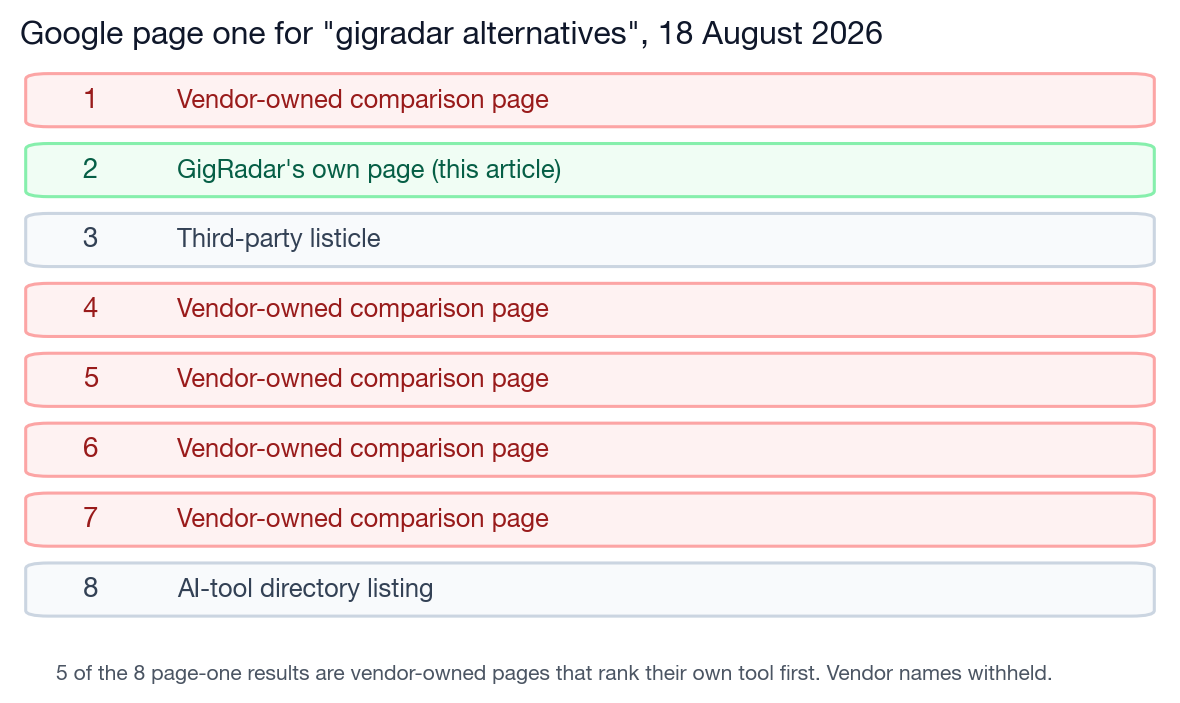
Page one of Google for "gigradar alternatives," 18 August 2026. Five of the eight results are vendor-owned pages that rank their own tool at number one. Vendor names withheld on purpose.
What none of them mention:
The "free trial" trap
Some tools offer free trials that require installing a Chrome extension and connecting your Upwork session. During the trial, the extension has full access to your account. If the trial triggers a flag, you can't un-ring that bell.
Worse: some of these tools have no way to cancel your subscription from the dashboard. No payment history. No cancel button. When you try to contact support, nobody responds for weeks. We've seen agencies charged months after they stopped using a tool, with zero recourse because the vendor has no self-serve cancellation flow. A free trial that puts your account at risk and locks you into billing isn't free.
The "AI proposals" quality gap
Every tool claims AI-generated proposals. The difference is whether a human reviews them before they ship. An AI cover letter that calls the client "Dear Hiring Manager" on a job posted by "Sarah, CTO at a Series B fintech" is worse than no proposal at all. It signals you didn't read the posting.
The pricing illusion
A cheap browser plugin and a full-service managed platform aren't the same product category. One enhances your manual workflow. The other is a complete operation with dedicated humans, AI engines, and analytics. Comparing them on price is like comparing a pocket calculator to an accountant.
The "support" question nobody tests before buying
When your automation tool breaks at 2 AM on a Tuesday and your active proposals are sitting in limbo, who do you call? Some vendors have no live support at all.
We've heard from agencies that waited weeks for a response from their previous tool's CEO, who scheduled a demo call and then never showed up. If the vendor can't support you when things go wrong, the tool is a liability, not an asset.
"But GigRadar costs more." Yes. Here's why.
GigRadar costs more than every Chrome extension tool and most BM-only services on the market. That's deliberate.
Here's what you actually get for it:
For an agency doing $10K+/month on Upwork, GigRadar typically costs a small fraction of revenue — less than what most agencies spend on connects alone. And unlike connects, this investment comes with someone whose full-time job is making sure your pipeline doesn't stop.
Interactive Calculator
How Much Time Is Your Agency Burning on Proposals?
Hours burned/month
48
Hours saved with managed BM
38
Connects waste vs. targeted
60%
3,000+ agencies, zero account suspensions
GigRadar has been running since 2021. Over 3,000 agencies have used the platform. The number of client Upwork accounts suspended because of GigRadar activity: zero.
Not "low." Zero.
Why agencies switch to GigRadar
A pattern we see regularly: agencies come to us after 6-12 months with a cheaper tool. The story is always the same.
They signed up for a cheap extension or a free-tier service. Then either their account got flagged, the support disappeared, or they realized the tool couldn't reach US/UK-restricted jobs where the real budgets are.
By the time they switch, they've already burned connects, lost time, and sometimes damaged their profile metrics. The step up to a managed BM isn't an upgrade. It's insurance against the cost of learning these lessons the hard way.
3,000+
Agencies served
89,000+
Proposals sent weekly
0
Client account suspensions
That's because the architecture makes suspensions structurally impossible. Your account never runs automation. Your browser never has an extension. Your login credentials are never shared with anyone.
The BM model means even if Upwork changes their detection algorithms tomorrow, your account is untouched. You're not betting on a Chrome extension staying one step ahead of Upwork's security team. You're not in the game at all.
Who GigRadar isn't for (and I'm fine saying that)
GigRadar is not the right tool for everyone. If any of these describe you, a different solution makes more sense:
Solo freelancers under $5K/month: The unit economics don't work yet. Focus on manual bidding, nail your proposal template, and track reply rates in a spreadsheet until you're past $8K/month.
Agencies that want "set and forget" with zero oversight: GigRadar sends you proposal previews and analytics. If you're not going to look at them, you're paying for a system you're not using.
People who just need job alerts: A $10/month RSS tool or Upwork's built-in saved searches will do the job. You don't need a BM for that.
GigRadar is built for agencies doing $8K-50K/month on Upwork who can't afford to lose their accounts, want to scale proposal volume without adding headcount, and care about measuring what's actually working.
If that's you, book a free agency audit and we'll show you exactly what your pipeline could look like with the right system behind it.
Your account is your business
Stop gambling your Upwork agency on a Chrome extension
GigRadar's managed BM model means your account never touches automation. 3,000+ agencies. Zero client suspensions. See the difference in a 15-minute call.
Get Your Free Agency Audit →







